Activation and refresh
What it represents
A score has a lifecycle you can read off its status. Draft means it has never been scored and has no model bound yet. Ready means a model is bound and it could run. Active means it is running on a schedule. Paused means it ran before and has been stopped.
Activation is the step that turns configuration into a standing job. Once a score is active, ax1om recomputes it on the cadence you set and, when you have pointed it at a CRM field, writes the result back.
How it’s calculated
Activating requires at least one rule with a model bound to it. Until then the button refuses and says so. Everything else is set on the score’s own detail page, in two cards.
-
Read the Configuration card first
It is the whole contract in nine values: which connection the records come from, the primary entity being scored, what counts as success, the date that dates it, and whether the API and engagement features are on. None of it changes at activation, so if something here is wrong, fix it before you start a standing job on top of it.
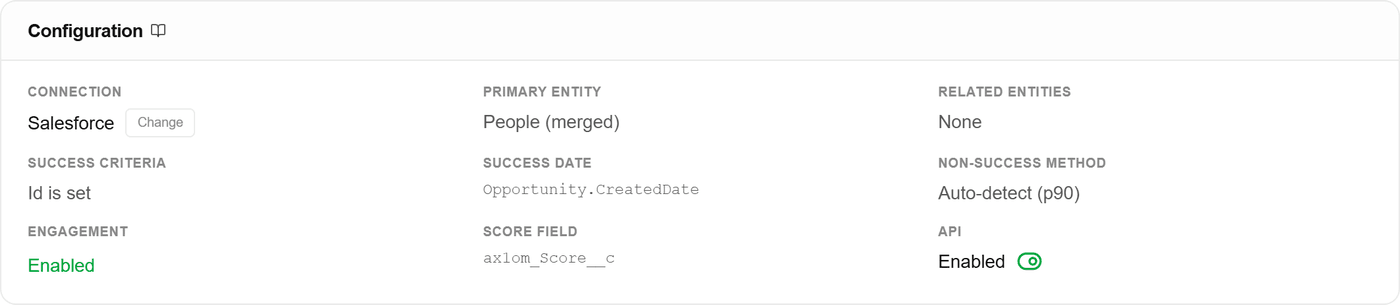
The Configuration card · the score field is the CRM column every run writes to, and Not set means nothing is written back yet. -
Point the score at your CRM fields
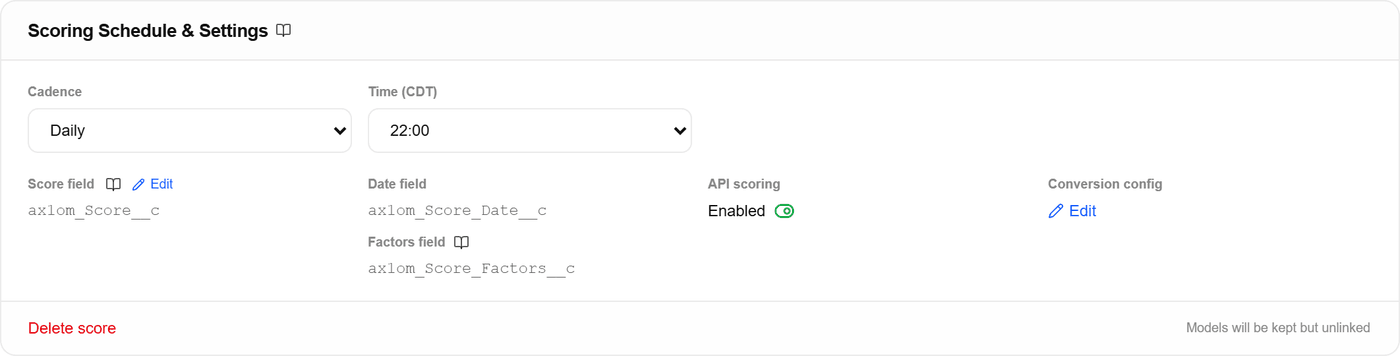
Three fields, all optional, all set on the score rather than on the model: a number field for the score itself, a date field for when it was written, and a text field for the factors behind it. Set them from the Scoring Schedule and Settings card.

Score field, date field, factors field · a run fills in whichever ones are set and skips the rest. If no score field is configured, the run still scores and simply reports that writeback was skipped. Scoring and writing are separate legs, and a missing field is not treated as a failure.
-
Set the cadence
The schedule has three parts: cadence (daily, weekly, biweekly, or monthly), the day for anything other than daily, and the hour, in your organization's timezone. Schedule changes save on their own as you make them, so there is no separate save step to forget.
Weekly on Monday at 06:00 · the time label carries your organization's timezone, not the reader's. -
Activate, and let the first run prove it
A refresh recomputes the score for the record population using whichever models are bound right now. If a CRM score field is configured, the run then writes each record's score to it, plus the date field and the factors field when those are set.
You do not have to wait for the schedule to see it work. Trigger a run yourself at any time, without touching the cadence you just set.
Pausing stops the schedule. Configuration, rules, models, and scoring history all stay exactly as they were.
What it means for you
Worked example: you activate a people score weekly, Monday at 06:00. Each run scores roughly 40,000 records and writes to one CRM number field and one text field. When your team opens their views on Monday morning, the ordering already reflects last week’s activity, with no export and no manual step.
Two things worth knowing. Score activation is part of the Pro plan. And a refresh reflects the models bound at the moment it runs, so approving a retrained model changes what the next run produces · which is the point, but it is worth timing deliberately rather than mid-quarter by accident.